How we made a giant crossword for our wedding
My wife and I wanted a personal reception game that guests could work on together. I could not find a free tool that made the large, printable crossword we had in mind, so I built one.
Create your crossword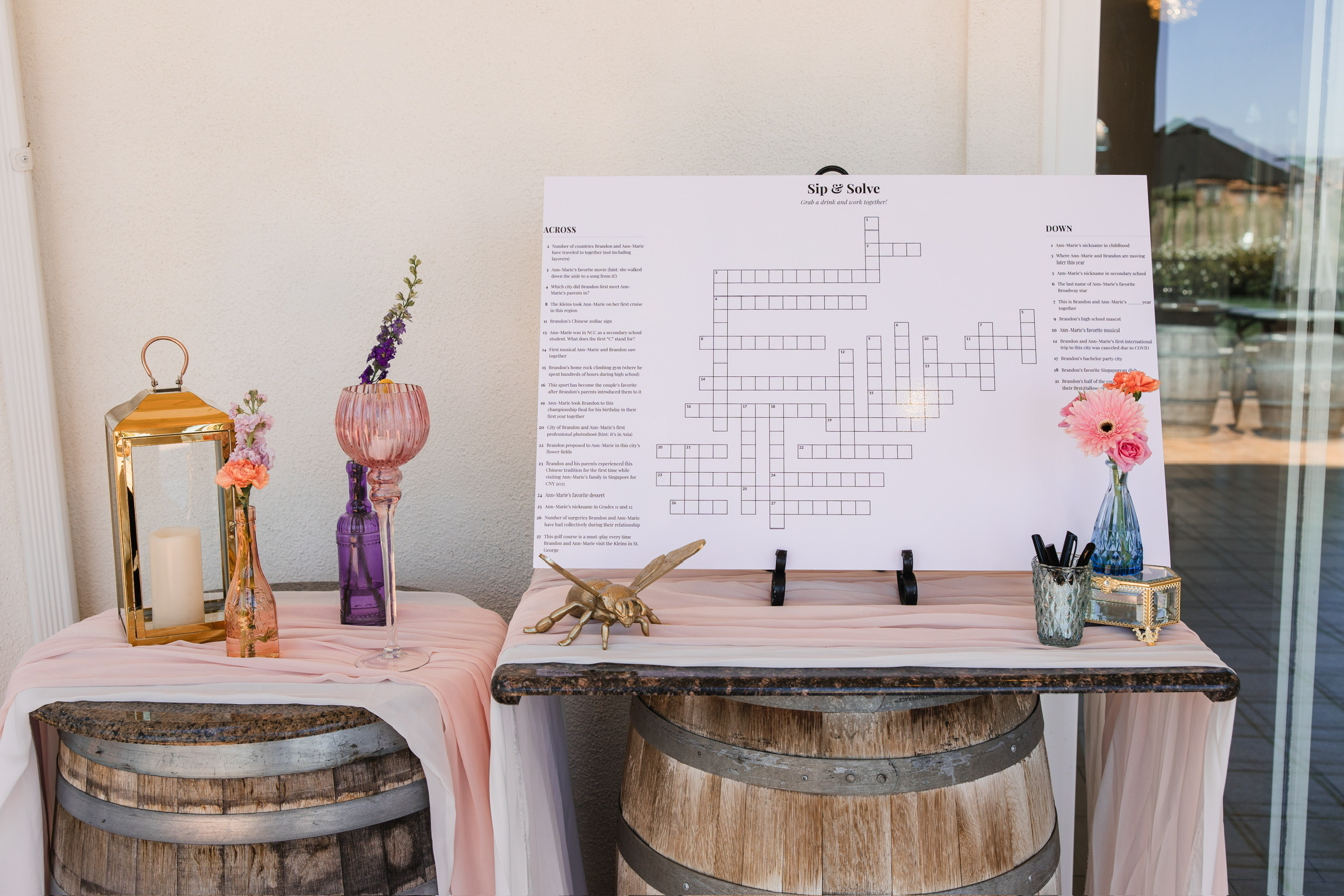
Why I built this website
A crossword let guests join for one clue or stay and solve several. It did not need a host or a fixed start time.
The generators I tried could make a grid, but they did not give me the large-format layout and print control I needed. I built this site for our wedding and kept it online for other couples.
How to make a wedding crossword like ours
- List personal answers, then write clues for a mixed crowd
- Build the grid and check every clue and spelling
- Use a landscape layout with the clue columns beside the grid
- Download the poster HTML
- Print it as Architecture D, 24 by 36 inches, and save it as a PDF
- Upload the PDF to a laminated foam-board printer
- Display the board with markers where guests naturally gather
What worked at our reception
We placed the board near the drinks so people found it without an announcement. Guests stopped for a clue, compared answers, and came back later.
The large board made the activity collaborative. Easy clues helped people start, while family stories and inside jokes gave different groups something to contribute.
What the website does
WeddingCrosswordPuzzle.com is a free wedding crossword generator. It arranges your clues, lets you adjust the design, and downloads files for a large poster or smaller printed copies.
The site does not require an account. Drafts stay in your browser unless you choose to create a share link.